How to Use WhatsApp for Customer Support: Complete Guide (2026)
Complete guide to setting up WhatsApp as a customer support channel. Covers AI vs human support, response time benchmarks, escalation workflows, and measuring CSAT.
Last reviewed: Mar 31, 2026
Reviewed by: Waslo Team
Key takeaways
- WhatsApp support works best when businesses combine fast AI resolution for common issues with clear escalation paths for human cases.
- Customers prefer support channels that preserve context, reduce wait time, and allow media sharing inside the same thread.
- Support quality improves when response benchmarks, handoff rules, and satisfaction metrics are designed deliberately instead of reactively.
WhatsApp Is Becoming the Default Support Channel
Here is a pattern playing out across industries: a customer has a problem. They search the company's website for a support email. They find it, write a detailed message, and wait. Hours pass. Maybe a day. They get a templated response asking them to describe the problem again. The ticket bounces between departments. Resolution comes in days, not minutes.
Now here is the alternative: the customer opens WhatsApp, sends a message describing their problem, and gets a helpful response in under 30 seconds. The conversation is natural, the context carries forward, and the issue gets resolved in a single session.
Customers overwhelmingly prefer the second experience, which is why WhatsApp is rapidly becoming the primary support channel for businesses in markets across the Middle East, Asia, Latin America, and Europe. Over 2 billion active users are already on the platform, and the average message open rate exceeds 98%. Compare that to email support, where less than half of messages are ever opened.
This guide covers everything you need to set up WhatsApp as a customer support channel: the technology, the workflows, the team structure, and the metrics that matter.
Part 1: The Case for WhatsApp Support
Why Customers Prefer It
The reasons customers prefer WhatsApp for support are straightforward:
- Familiarity. They already use WhatsApp daily. No new app to download, no portal to log into, no ticket number to remember.
- Asynchronous. Unlike phone support, WhatsApp does not require the customer to wait on hold. They send a message and continue their day.
- Persistent context. The conversation history is right there. If the issue spans multiple interactions, nobody has to start from scratch.
- Rich media. Customers can send photos, screenshots, voice notes, and videos to explain their problem. "The screen looks like this" is infinitely more useful than a written description.
- Speed. Average response times on WhatsApp are measured in seconds or minutes, not hours or days.
Why Businesses Benefit
From the business side, WhatsApp support offers advantages that other channels do not:
- Lower cost per interaction. WhatsApp conversations are typically shorter and more efficient than phone calls or email threads.
- Higher agent productivity. Support agents can handle multiple WhatsApp conversations simultaneously, unlike phone calls.
- Better documentation. Every conversation is automatically recorded with timestamps, making quality assurance and dispute resolution straightforward.
- Built-in customer identification. Phone numbers are unique identifiers. No more "Can you verify your email and account number?" at the start of every interaction.
- Reduced ticket volume. When customers can get quick answers via WhatsApp, fewer issues escalate into formal support tickets.
Part 2: Setting Up WhatsApp Support
Choosing Your Technology Approach
There are two main approaches to running WhatsApp support, and the choice depends on your scale, budget, and technical resources.
Approach A: WhatsApp Business API
The official WhatsApp Business API is Meta's enterprise solution. It requires applying for access through a Business Solution Provider (BSP), undergoing a verification process, and paying per-conversation fees. Setup takes days to weeks and requires technical implementation.
Best for: Large enterprises with dedicated engineering teams and high message volumes where the per-conversation cost model makes financial sense.
Approach B: QR Code Connection via AI Agent Platform
Modern AI agent platforms let you connect your WhatsApp number by scanning a QR code — the same process as setting up WhatsApp Web. No API application, no verification process, no per-message fees. You are live in minutes.
Best for: Small and mid-sized businesses that want to move quickly, avoid per-message fees, and get AI capabilities included rather than as an expensive add-on.
The right choice depends on your specific situation. For most businesses under enterprise scale, the QR code approach delivers faster time-to-value with significantly lower total cost of ownership.
Structuring Your Support Workflow
An effective WhatsApp support workflow has three tiers:
Tier 1: AI Agent (Automated)
The AI agent handles the first response and attempts to resolve the issue automatically. It can:
- Answer frequently asked questions (business hours, return policies, pricing, how-to instructions)
- Guide customers through troubleshooting steps
- Collect information needed for resolution (order number, account details, description of the issue)
- Provide order status updates when integrated with your systems
- Send relevant documentation, how-to guides, or video tutorials
A well-configured AI agent resolves 40-70% of support inquiries without any human involvement. The key word is "well-configured" — the AI needs your specific knowledge base, policies, and procedures in its system prompt.
Tier 2: Human Agent (Specialist)
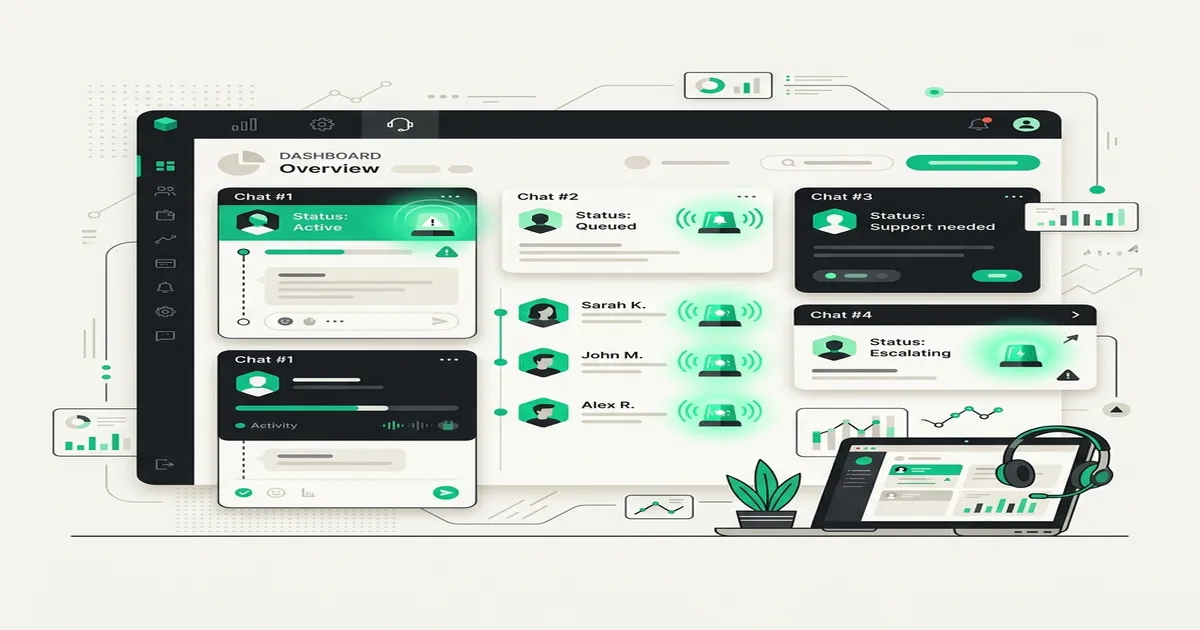
When the AI cannot resolve the issue, it hands off to a human agent. The handoff should be seamless — the customer should not have to repeat anything. The human agent receives the full conversation history plus the AI's classification of the issue type and severity.
Human agents handle:
- Complex troubleshooting that requires judgment calls
- Billing disputes and refund requests
- Emotional customers who need empathy and de-escalation
- Issues that require accessing internal systems the AI is not connected to
- Exceptions to standard policies
Tier 3: Escalation (Manager/Specialist Team)
Some issues require senior authority or specialized knowledge. The handoff from Tier 2 to Tier 3 should include the full conversation context plus the agent's assessment and any actions already taken.
Configuring Your AI Agent for Support
The system prompt for a support AI agent is different from a sales AI agent. Here is what to include:
Product/service knowledge:
- What you sell and how it works
- Common issues and their solutions
- Current known bugs or outages
- Recent changes or updates customers might be confused about
Policy knowledge:
- Return and refund policies (conditions, timeframes, process)
- Warranty terms
- Shipping and delivery expectations
- Account and billing procedures
Troubleshooting flows:
- Step-by-step resolution paths for your top 10 most common issues
- When to suggest restarting, clearing cache, reinstalling, etc.
- What information to collect before escalating
Tone and behavior:
- Empathetic and patient (support customers are often frustrated)
- Clear and concise (avoid jargon)
- Solution-oriented (focus on resolving, not explaining why the problem exists)
- Proactive (offer next steps without being asked)
Escalation rules:
- Keywords that trigger human handoff: "speak to a person," "manager," "refund," "complaint," "cancel"
- Situations to escalate: the customer has expressed frustration twice, the issue involves billing, the AI does not have the information to resolve the issue
Setting Response Time Standards
Response time is the single most important metric in customer support. Here are benchmarks for WhatsApp support in 2026:
| Metric | Good | Great | Industry-Leading |
|---|---|---|---|
| First response time | Under 5 minutes | Under 1 minute | Under 10 seconds |
| Resolution time (Tier 1) | Under 15 minutes | Under 5 minutes | Under 2 minutes |
| Handoff response time | Under 10 minutes | Under 5 minutes | Under 2 minutes |
| Full resolution (all tiers) | Under 4 hours | Under 1 hour | Under 30 minutes |
An AI agent achieves "industry-leading" first response time automatically. The challenge is maintaining fast response times at the human handoff point, which requires staffing and scheduling discipline.
Part 3: Advanced WhatsApp Support Strategies
Proactive Support Messages
Do not wait for customers to reach out with problems. Use WhatsApp proactively:
- Order updates: "Your order #1234 has shipped! Track it here: [link]"
- Appointment reminders: "Reminder: your appointment is tomorrow at 2 PM. Reply RESCHEDULE if you need to change."
- Service notifications: "We're performing maintenance tonight from 11 PM - 2 AM. You might experience brief interruptions."
- Product tips: "You purchased [product] last week — here are 3 tips to get the most out of it."
Proactive messages reduce inbound support volume by addressing issues before they become problems. They also dramatically improve customer perception of your brand.
Multimedia Support
WhatsApp's rich media support makes it a superior support channel for visual troubleshooting. Encourage customers to use it:
- "Could you send a photo of the issue? That will help me identify the problem faster."
- "Here's a quick video showing how to reset the device." (send a pre-recorded tutorial)
- "I see the photo you sent — that looks like [issue]. Here's how to fix it..."
For businesses with AI agents that support multimodal input (images, audio, video), the AI can analyze photos and screenshots to diagnose issues automatically. A customer sends a photo of an error screen, and the AI recognizes the error code and provides the resolution without human involvement.
After-Hours Support Strategy
One of the biggest advantages of WhatsApp support is that it does not require 24/7 staffing to deliver 24/7 availability. Here is how:
During business hours: AI agent handles Tier 1. Human agents handle Tier 2 and 3.
Outside business hours: AI agent handles everything it can resolve. For issues requiring human attention, the AI collects all relevant information, sets expectations ("Our team will review this first thing in the morning and get back to you within 2 hours"), and queues the issue for the first available agent.
Customers are generally fine with waiting until business hours as long as they:
- Got an immediate acknowledgment
- Were able to explain their issue fully
- Received a clear expectation of when they will hear back
- Trust that their issue was captured and will not be forgotten
Handling Angry Customers
Angry customers are inevitable. Here is how to configure your support workflow to handle them effectively:
AI agent detection: Configure the AI to detect frustration signals — repeated messages, caps lock, words like "terrible," "worst," "unacceptable," "never." When detected, the AI should:
- Acknowledge the frustration: "I completely understand how frustrating this is, and I'm sorry for the inconvenience."
- Not try to fix the problem with more automation. Instead, escalate immediately: "I'm connecting you with a support specialist who can resolve this directly."
- Provide clear expectations: "A team member will be with you within [X] minutes."
Human agent response: The agent who picks up the escalated conversation should lead with empathy, not solutions. "I can see from our conversation that this has been a really frustrating experience, and I want to make this right for you" goes further than jumping straight into troubleshooting.
Part 4: Measuring Support Quality on WhatsApp
Key Metrics to Track
Volume metrics:
- Total conversations per day/week/month
- Peak hours and days
- Conversations by issue category
Efficiency metrics:
- First response time
- Average resolution time
- AI resolution rate (percentage resolved without human involvement)
- Agent utilization (conversations per agent per hour)
Quality metrics:
- Customer satisfaction (CSAT) score
- First-contact resolution rate
- Escalation rate
- Reopen rate (same customer contacting about the same issue)
Measuring CSAT via WhatsApp
Traditional CSAT surveys have terrible completion rates when sent via email. On WhatsApp, they perform significantly better because the survey feels like a natural part of the conversation.
After resolving an issue, send a simple message:
"Thanks for chatting with us! How would you rate your support experience today? Reply with a number from 1 (poor) to 5 (excellent)."
Single-question surveys on WhatsApp typically achieve 30-50% response rates, compared to 5-15% for email surveys. The data is more reliable because the sample is larger and less biased toward extremes.
Using Data to Improve
Review your WhatsApp support data weekly. Look for:
- Repeated questions the AI cannot answer. These are gaps in your AI agent's knowledge base that can be filled by updating the system prompt.
- Common escalation reasons. If the same issue type consistently requires human intervention, consider whether the AI can be trained to handle it.
- Peak volume times. Schedule human agent availability to match demand.
- Agent performance differences. Use conversation data for coaching and training.
Making the Transition
If your business currently relies on email or phone support, transitioning to WhatsApp does not have to be all-or-nothing. Start by:
- Adding WhatsApp as an option alongside existing channels. Many businesses add a "Message us on WhatsApp" button to their support page and let customer behavior determine adoption.
- Handling one category on WhatsApp first. Order status inquiries or FAQ questions are good starting points because the AI can resolve most of them automatically.
- Measuring and comparing. After a month, compare resolution times, CSAT scores, and cost per interaction between WhatsApp and your other channels. The data typically makes the case for expansion.
- Gradually shifting volume. As your team gets comfortable, promote WhatsApp as the preferred support channel for more issue types.
The businesses that get the most value from WhatsApp support are the ones that treat it as a primary support channel with dedicated configuration, staffing, and measurement — not as an afterthought bolted onto their existing system.
Ready to Get Started?
Waslo gives you an AI-powered WhatsApp agent with flat pricing, zero per-message fees, and setup in under 2 minutes. No WhatsApp Business API required — just scan a QR code and go live.
Start free today — 75 free credits on signup, no card needed.