The Art of AI-to-Human Handoff: When Your AI Agent Should Step Back
Master AI-to-human handoff on WhatsApp. Learn when your AI agent should transfer to a human, trigger types, and best practices for seamless transitions.
Last reviewed: Mar 31, 2026
Reviewed by: Waslo Team
Key takeaways
- AI-to-human handoff is not a failure mode; it is a core part of a strong WhatsApp customer experience.
- The best handoffs happen when the AI explains the transition clearly and the human picks up with full conversation context.
- Keyword triggers, intent signals, and lead value signals should all influence when a conversation moves from AI to a team member.
The Handoff Problem Nobody Talks About
Every business exploring AI automation eventually faces the same question: what happens when the AI cannot — or should not — handle a conversation?
It is an important question, and the answer separates good AI implementations from bad ones.
A bad handoff experience looks like this: the customer is mid-conversation with what they think is a helpful assistant, they ask something the AI cannot handle, and the conversation just... stops. No explanation. No transition. They are left in limbo, wondering if anyone is listening.
A good handoff is invisible. The customer barely notices the transition. The human agent picks up with full context. The conversation continues seamlessly. The customer gets what they need, and they walk away thinking your business is remarkably responsive.
This article covers everything you need to know about AI-to-human handoff on WhatsApp: when it should happen, how to configure it, and the best practices that make the difference between a frustrated customer and a delighted one.
Why Handoff Matters More Than You Think
Some businesses resist implementing handoff because they see it as admitting the AI is not good enough. This is exactly backward. Handoff is what makes AI good enough.
Here is the reality: modern AI agents handle the vast majority of conversations brilliantly. They answer product questions, qualify leads, provide pricing information, schedule appointments, and guide customers through processes — all instantly and at scale.
But there are situations where a human is simply better:
- Complex negotiations with custom pricing or terms
- Emotionally sensitive situations where empathy matters
- Edge cases the AI was not configured to handle
- High-value deals where the personal touch makes the difference
- Complaints or escalations that require human judgment
- Legal or compliance-sensitive topics that need human oversight
The AI's job is not to replace humans entirely. It is to handle the 80% of conversations that follow predictable patterns, so your human team can focus their energy on the 20% that truly need them.
Without proper handoff, you are stuck choosing between two bad options: either let the AI fumble through conversations it cannot handle (damaging your brand) or do not use AI at all (leaving the scaling and speed problems unsolved).
Handoff gives you a third, better option: AI handles what it is good at, humans handle what they are good at, and the transition between them is smooth.
The Three Types of Handoff Triggers
Effective handoff systems use multiple trigger types to detect when a conversation should be transferred to a human. Each type catches different scenarios.
1. Keyword-Based Triggers
Keyword triggers are the most straightforward. You define a list of words or phrases that, when detected in a customer's message, signal that a human should take over.
Common handoff keywords:
- "speak to a human" / "talk to a person" / "real person"
- "manager" / "supervisor" / "complaint"
- "cancel" / "refund" / "lawsuit"
- "urgent" / "emergency"
- Custom terms specific to your business
Keyword triggers are precise and predictable. When a customer explicitly asks for a human, the system should always honor that request immediately.
Configuration tips:
- Include common variations and misspellings
- Consider your customers' language patterns (formal vs. informal)
- Add industry-specific escalation terms
- Update keywords regularly based on conversation review
2. Sentiment and Context Triggers
Beyond explicit keywords, some situations require handoff based on the overall tone or context of the conversation:
- Frustration signals: Repeated questions, ALL CAPS messages, explicit dissatisfaction
- Complexity signals: Questions the AI deflects or answers vaguely multiple times
- High-value signals: Large order quantities, enterprise inquiries, partnership requests
- Sensitivity signals: Health issues, financial hardship, legal references
These triggers are harder to define with simple keywords, which is why AI-powered detection is valuable. The AI agent can recognize when a conversation is going sideways even if the customer has not used any specific trigger words.
3. Classification-Based Triggers
Lead classification and handoff work together powerfully. When the AI classifies a lead as HOT — indicating high purchase intent — you may want to automatically transfer to a human closer.
This approach ensures that your most valuable leads get personal attention at exactly the right moment. The AI does the qualification work, identifies the opportunity, and hands it to your team with full context.
You can configure classification-based handoff rules like:
- HOT leads always trigger handoff
- HOT leads in a specific product category trigger handoff
- Any lead that mentions a deal value above a threshold triggers handoff
Anatomy of a Seamless Handoff
A well-executed handoff has four distinct phases. Getting each one right is critical.
Phase 1: Detection
The system detects that a handoff should occur. This can be any of the trigger types described above: a keyword match, a sentiment shift, or a classification threshold.
Detection should be fast. The moment a trigger is identified, the handoff process begins. There should be no delay between the customer saying "I want to speak to a human" and the system initiating the transfer.
Phase 2: Acknowledgment
The customer receives an immediate message acknowledging that their request is being handled. This is crucial — without it, the customer thinks they are being ignored.
A good acknowledgment message:
- Confirms the request was heard
- Sets expectations for what happens next
- Provides a timeframe if possible
- Maintains a professional, reassuring tone
Example: "I understand you'd like to speak with a team member. I'm connecting you now — someone will be with you shortly. They'll have the full context of our conversation."
This message should be sent automatically and instantly. The customer should never wonder whether their request was received.
Phase 3: Team Notification
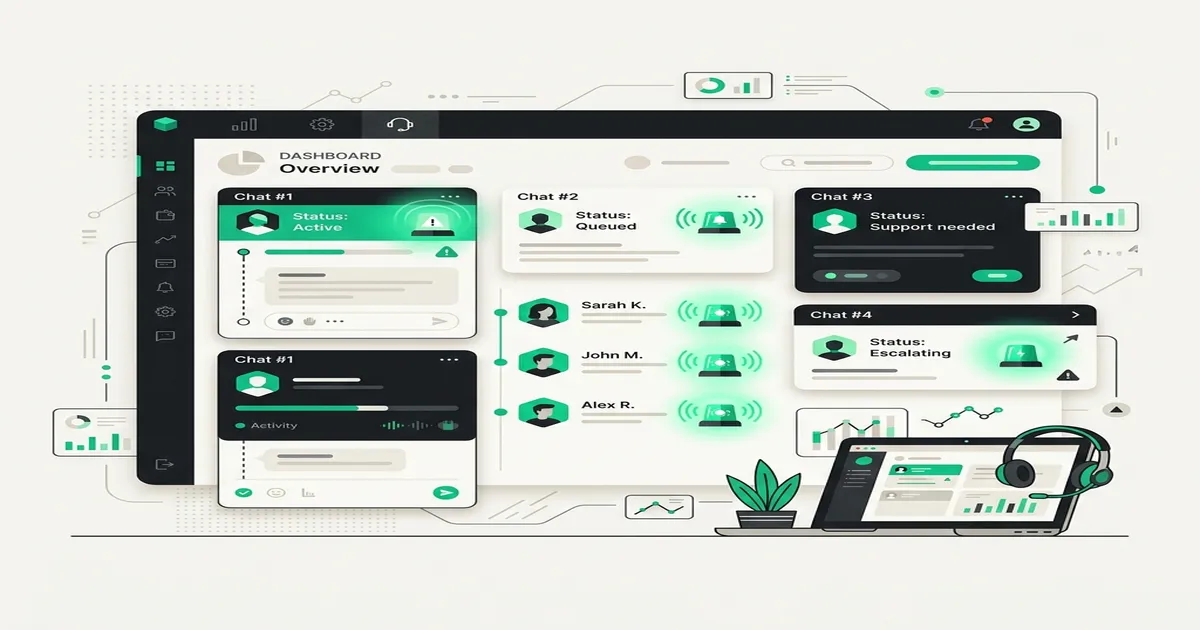
Your team needs to know about the handoff immediately. Effective notification includes:
- Who: The lead's name and phone number
- Why: What triggered the handoff (keyword, classification, etc.)
- Context: A summary or the full conversation history
- Where: A direct link to the conversation in your dashboard
The notification should go to the right people. A sales handoff goes to sales. A complaint goes to support. A VIP client goes to the account manager.
Telegram notifications are particularly effective for this because they are instant, mobile-friendly, and hard to miss. Your team gets a notification on their phone the moment a handoff occurs, along with enough context to respond intelligently.
Phase 4: Human Response
The human agent opens the conversation with full context. They can see everything the AI discussed with the customer, including the classification, the handoff reason, and the complete message history.
This is where most handoff implementations fail. If the human agent has to start from scratch — "Hi, how can I help you?" — the customer has to repeat everything they already said. This is frustrating and makes your business look disorganized.
With proper context transfer, the human agent can pick up exactly where the AI left off: "Hi Sarah, I see you're interested in our premium package and have a question about the annual commitment. Let me help with that."
The difference in customer experience is dramatic.
Configuring Your Handoff Strategy
Setting up handoff requires balancing two competing concerns: you want to catch every situation that needs a human, but you do not want to over-trigger and send conversations to your team that the AI could handle perfectly well.
Here is a practical approach:
Start Conservative
In the first week, set your handoff triggers broadly. Include common keywords, set classification triggers for HOT leads, and err on the side of transferring too much rather than too little.
This gives you a baseline understanding of what types of conversations trigger handoff and how often. It also lets you evaluate the AI's handling of conversations that did not trigger handoff — you might find it is doing better than you expected.
Review and Refine
After a week, review every handoff that occurred:
- Justified handoffs: The human needed to be involved. Keep these triggers.
- Unnecessary handoffs: The AI could have handled it. Remove or narrow these triggers.
- Missed handoffs: Situations where the AI struggled but no handoff occurred. Add new triggers for these patterns.
Establish Response Protocols
Handoff is only as good as the human response that follows. Define clear protocols:
- Response time target: How quickly should a team member respond after handoff? (Aim for under 5 minutes during business hours.)
- Ownership: Who owns handoff conversations? Is there a rotation? A primary assignee?
- Escalation: What happens if no one responds within the target time?
- Resolution: How does the human agent mark the conversation as resolved? When does the AI resume?
Configure AI Resume
After a human resolves the issue, the conversation can return to AI handling. This prevents your team from being permanently responsible for every conversation that triggered a single handoff.
The resume process should be explicit — a team member clicks "Resume AI" in the dashboard, confirming that the human-handled issue is resolved and the AI can take over future messages.
Best Practices for Handoff Excellence
1. Never Lie About Being AI
Do not configure your AI to claim it is human, then handoff to an actual human. This creates a confusing experience and erodes trust. It is perfectly fine for your AI agent to handle conversations without explicitly stating it is AI in every message, but if a customer asks directly, honesty is the only policy.
2. Make Handoff Keywords Prominent
If your business model relies on high-touch sales, consider having your AI proactively mention that a human is available. For example: "I can answer most questions about our services. If you'd like to speak with a team member at any point, just let me know."
This gives customers an easy path to a human and reduces the frustration of feeling trapped in an automated conversation.
3. Use Handoff Data to Improve Your AI
Every handoff is a learning opportunity. If the same topic triggers handoff repeatedly, consider training your AI to handle it. If customers frequently ask for a human when discussing pricing, maybe your pricing prompt needs more detail.
Over time, your handoff rate should decrease as you improve the AI's capabilities. But it should never reach zero — there will always be situations that need a human.
4. Set Expectations During Off-Hours
If your team is not available 24/7, your handoff message should reflect that. Instead of "someone will be with you shortly" at 2 AM, try: "I've flagged this for our team. They'll reach out to you first thing in the morning during our business hours (9 AM - 6 PM). Is there anything else I can help with in the meantime?"
This is honest, sets correct expectations, and keeps the customer engaged rather than frustrated.
5. Track Handoff Metrics
Monitor these key metrics:
- Handoff rate: Percentage of conversations that trigger handoff. High rates might indicate AI configuration issues. Very low rates might indicate missing triggers.
- Handoff response time: How quickly your team responds after handoff. This directly impacts customer satisfaction.
- Handoff resolution rate: What percentage of handoff conversations result in a positive outcome.
- Handoff reasons: Which triggers fire most often. This tells you what your AI needs to improve on.
6. Differentiate by Lead Value
Not all handoffs are equal. A hot lead asking to speak with sales should get a faster, more senior response than a cold lead asking a general question. Use classification data to route handoffs appropriately.
7. Keep the Conversation in One Place
The worst handoff experience is when the customer gets transferred to a different channel. "Please email us at support@..." or "Please call this number..." breaks the conversation and often loses the customer entirely.
Keep the conversation on WhatsApp. The human agent responds in the same thread. The customer does not have to switch apps, repeat context, or start over.
Common Handoff Mistakes
The Ghost Handoff
The AI stops responding but nobody picks up. The customer is in limbo. This is worse than no handoff at all because the customer knows something was supposed to happen and it did not.
Fix: Always send an acknowledgment message. Set up escalation alerts if no human responds within your target time.
The Repeat Handoff
The customer explains their issue to the AI, gets handed off, explains it again to the human, and then gets transferred to another department where they explain it a third time.
Fix: Full conversation context must be visible to the human agent. No exceptions.
The Premature Handoff
The AI triggers handoff on a keyword that appeared in a harmless context. For example, the word "cancel" in "Can I cancel my appointment for Tuesday and reschedule for Wednesday?" triggers an unnecessary escalation.
Fix: Review your trigger keywords in context, not in isolation. Use phrase matching rather than single-word matching where possible.
The Missing Handoff
The customer is clearly frustrated, the AI keeps responding with generic answers, and no handoff ever occurs. The customer gives up and leaves.
Fix: Regularly review conversations where customers stopped responding. Look for patterns that should have triggered handoff but did not.
The Business Impact of Great Handoff
When handoff is done right, the impact extends beyond individual conversations:
- Customer satisfaction increases because people feel heard and supported
- Conversion rates improve because hot leads get personal attention at the right moment
- Team efficiency increases because humans only handle conversations that need them
- AI trust builds because customers learn that the system works and a human is always available
- Brand perception improves because smooth handoff signals a professional, well-run operation
The businesses that nail handoff create a virtuous cycle: customers trust the AI agent because they know a human is always behind it, which means they engage more openly with the AI, which means the AI qualifies them better, which means handoffs to humans are higher quality and more likely to convert.
The Bottom Line
AI-to-human handoff is not a backup plan for when the AI fails. It is a core feature of any well-designed AI agent system. The AI and humans work together, each doing what they do best, with seamless transitions between them.
The goal is not to eliminate human involvement. It is to make human involvement count — to ensure that when a person on your team picks up a conversation, it is a conversation that truly benefits from their expertise, empathy, and judgment.
Get handoff right, and your AI agent becomes more than a tool. It becomes a trusted first point of contact that customers are happy to engage with, knowing that a real person is just a message away.
Ready to Get Started?
Waslo gives you an AI-powered WhatsApp agent with flat pricing, zero per-message fees, and setup in under 2 minutes. No WhatsApp Business API required — just scan a QR code and go live.
Start free today — 75 free credits on signup, no card needed.